
Table of Contents
ToggleHome health agency software touches every step from referral to payment. A nurse can sign an assessment and still have the upload fail. In 2026, your team needs to know where that failure shows up.
Agency owners should test what’s changed in the assessment forms, the submission workflows, and the Medicare payment settings. Decide who’s going to fix each one prior to it getting into the billing queue.
Here’s what changed in 2026 across assessment forms, iQIES submissions, and Medicare billing, and what your team should test in the software you already use.
What changed in home health agency software in 2026?
OASIS-E2 changed what clinicians see and what software exports
CMS made OASIS-E2 effective 1 April 2026. OASIS stands for Outcome and Assessment Information Set. Use the M0090 assessment completion date to determine the applicable version.
The update introduced a revised transportation item and added items at resumption of care. Test those workflows separately from admission.
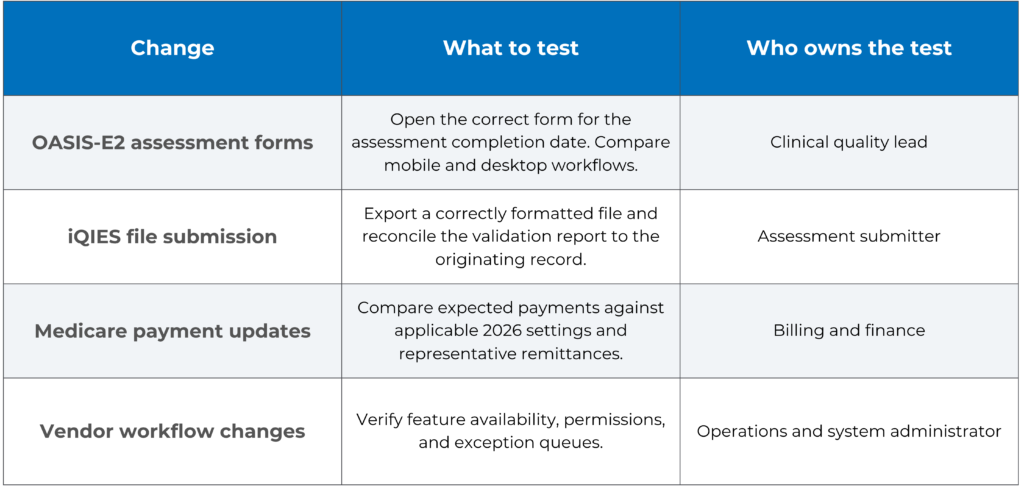
Have your quality lead open both assessments in your home health EMR software and compare what the clinicians see with what the software exports.
Test a draft that covers a version change and a correction to an older assessment. Ask your vendor to demonstrate how they deal with both scenarios.
Give the field staff one example they can practice with the devices they use. Have the reviewer confirm that the submitted values match the clinician’s documentation.
Legacy manual entry in iQIES ended for newer assessments
CMS has discontinued legacy manual entry in iQIES for OASIS assessments with target dates on or after 1 April 2026. Agencies must upload correctly formatted files.
The notice also sets out a transition period through 31 December 2026 for prior assessments dated from 1 January 2025 through 31 March 2026.
Build your test around the full handoff. The clinician does the assessment, it’s quality reviewed, the submitter uploads it, and then someone does the reconciliation.
Imagine a scenario where an assessment is closed in the EMR, only for iQIES to reject the file. On the clinical dashboard, it still appears as if everything has been completed.
The submitter should check the validation message and carry out the correction. Quality reviews the clinical content. The system administrator looks at any export or mapping errors with the vendor.
Track the record until the agency confirms acceptance. If they don’t, then a failed upload can sit in the completed work queue right up to the reporting deadline.
All-payer OASIS still needs an intake control
Mandatory all-payer collection commences 1 July 2025 for qualifying starts of care. CMS will apply the requirement across all pay sources for patients who meet the criteria.
Test whether staff can identify an eligible patient when coverage changes. Review exempt cases separately and give intake staff a route for escalating unclear cases.
Document coverage and authorization are separate from the assessment decision. Each check is in a different part of the workflow and will have a different owner.
MedBill RCM’s guide to insurance eligibility verification tools explains how staff can separate coverage checks, authorization tracking, and billing readiness.
What 2026 vendor updates look like in practice
Axxess Home Health and OASIS-E2
Axxess published product-specific OASIS-E2 instructions, including guidance on adding OASIS-E2 user pay rates in user profiles.
If your agency is using that configuration then have both payroll and clinical operations test on the same visit. Make sure the assessment routes correctly and that the correct pay setting is applied.
Ask the vendor to show you how staff go about locating older records and correcting them. The demo should be done using your agency’s actual roles and configuration.
WellSky Home Health and assessment exports
Use WellSky’s OASIS-E2 training to brief your clinicians. Then go ahead and run a resumption of care assessment in your own environment and compare the signed record with the exported file.
KanTime and the billing handoff
If you’re using KanTime Home Health, test a payer change from intake right through to billing. Make sure the correct payer and any required authorization get carried through to the claim.
Homecare Homebase and assessment corrections
If you’re using Homecare Homebase (HCHB), walk through the corrected assessment via clinical review and export. Have the submitter demonstrate how they confirm that iQIES has accepted it.
HHAeXchange and visit exceptions
HHAeXchange has documented the 2026 changes to Visit Maintenance and Exception workflows. Feature availability will of course be subject to user permissions and agency settings.
If your agency uses HHAeXchange for home care, test whether authorised staff can filter and resolve visit exceptions whilst keeping the billing holds visible.
See MedBill RCM’s HHAeXchange workflow update for more detail on scheduling and electronic visit verification, or EVV.
Agencies with skilled home health and personal care lines should run separate tests. Keep the Medicare assessment submission completely separate from the state and payer visit verification workflows.
What billing should verify after an update?
The CY 2026 final rule modifies Medicare payment rates under the Home Health Prospective Payment System. When comparing expected payments, be sure to review the applicable 2026 settings.
Ask your home health billing software vendor how they apply payment updates. Find out which rates apply by date and how the system deals with adjustments and corrections.
Select a representative sample of Medicare claims and compare the expected payment against the actual remittance. Look at the variances before you use those settings for forecasting or underpayment review.
Test other payers separately. An authorization may list approved units while the claim still needs correct service dates, coding, and documentation.
In a hypothetical scenario, an interface drops the auth ID following a coverage change. Intake will check the current approval. Billing will review the records in question prior to release.
Assign the clearinghouse rejections to the staff that can fix the submission errors. Route the adjudicated denials to the staff who can review the payer’s decision and determine the appropriate response.
How agency owners should test a release
When evaluating software for home health agencies, ask for the release date, affected modules, and configuration steps. Identify which changes your staff must enable.
Have a clinical lead, an intake rep, a biller, and a submitter all run the same scenarios. One standard case and then some exceptions (for coverage changes, corrections, and failed exports).
Ask each team to show its work queue. Check who receives an alert, who can correct the record, and how the next department knows it can proceed.
Capture the validation result, the test claim status, and the names of the people who have signed off. Record the expected outcome so that the staff can re-run the test at a later date.
Track exceptions that can delay revenue
Review assessment upload failures, unresolved authorization holds, clearinghouse rejections, and days from claim readiness to submission. Compare these measures before and after the release.
Track how long exceptions remain open and how many occur. If the same items sit open week after week, check who is waiting on whom.
If a metric goes up, then look at a sample of the records before you assign a cause. Look at the error messages, the payers affected, the software versions, and when the exceptions started.
Make the next software review a workflow review
Check whether your home health agency software can carry a record from intake through assessment, submission, and billing. Pick one recurring problem and ask each team to show what they see and what they will do next.
If billing holds or payment variances persist after an update, MedBill RCM’s home health billing team can help review where the workflow is breaking down.
Frequently Asked Questions
What is home health software?
It helps agencies manage intake, scheduling, clinical documentation, assessment reporting, and billing. Some platforms cover several functions. Others connect to separate systems.
What is the best home health software?
Pick a platform that can deal with your payer mix, your assessment requirements, and your staffing workflows. Ask the vendors to show you how they’d deal with corrections and exceptions in the context of the scenarios your teams actually come across.
When did OASIS-E2 take effect?
OASIS-E2 took effect on 1 April 2026. Confirm the applicable instrument using the assessment completion date. CMS OASIS data sets
Can agencies still enter new OASIS assessments directly in iQIES?
CMS ended legacy manual entry for assessments with target dates on or after 1 April 2026. Those assessments require a correctly formatted upload. CMS technical notice
What should billing test after a software update?
Test payer mapping, authorization fields, claim edits, clearinghouse responses, and remittance posting. Include an exception and verify that staff can trace it to resolution.